thomas-wiegold.com
Notion Workers for Small Business: A Hands-On Guide
Thomas Wiegold walks through building a production Shopify sync Worker — the source for the pacer and HMAC patterns in this tip.
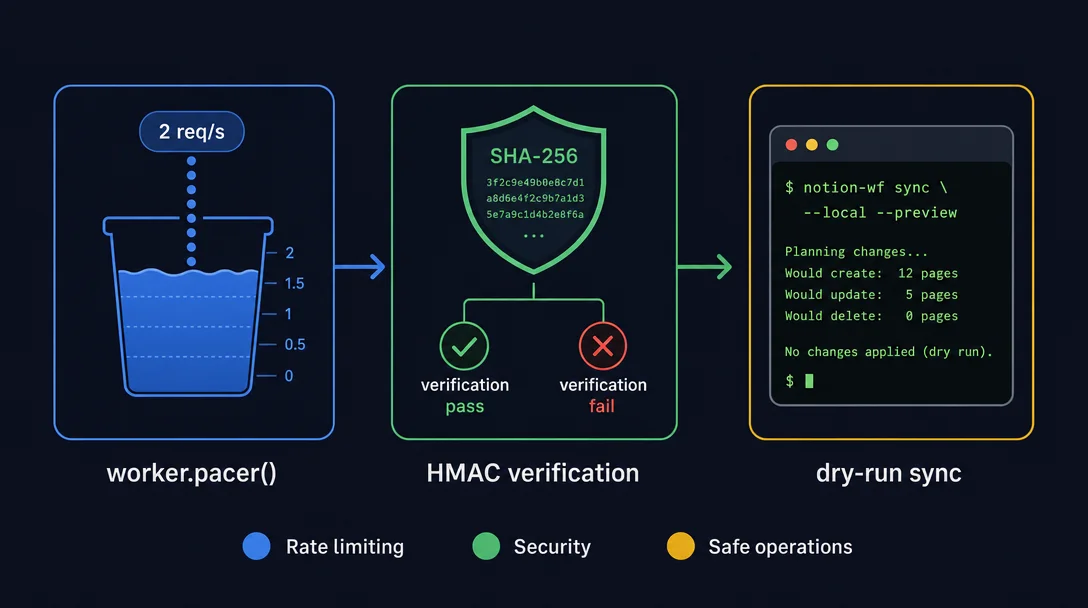
Three built-in SDK and CLI patterns that close the most common production failure modes for Notion Workers: `worker.pacer()` smooths outbound API call rate to prevent 429s; HMAC-SHA256 signature verification secures webhook endpoints from spoofed payloads (with Notion's 5-failure auto-lock explained); and `--local`/`--preview` flags on `ntn workers sync trigger` let you iterate sync logic against real source data without writing a single row to your live Notion database.

| Requirement | Details |
|---|---|
| Notion plan | Business or Enterprise |
ntn CLI installed | curl -fsSL https://ntn.dev | bash |
Workers SDK (@notionhq/workers) | Installed via ntn workers init scaffolding |
| A deployed Worker with a Sync or Webhook capability | Any capability from the previous tips works |
| External API with rate limits (for pattern 1) | Shopify, GitHub, Stripe, etc. |
worker.pacer()worker.pacer() is one of the six primitives in the Notion Workers SDK. 3 You declare a named budget with two parameters — allowedRequests (max calls per window) and intervalMs (window length in milliseconds) — then await handle.wait() before each outbound call. The SDK's server-side scheduler spreads the calls evenly across the window rather than letting them burst at the start. 3const shopify = worker.pacer("shopifyApi", {
allowedRequests: 2,
intervalMs: 1000,
});
// Before every external call:
await shopify.wait();
const orders = await fetchShopifyOrders(cursor);10/1000, each capability effectively gets ~3 requests/second. Set the budget to the per-process floor you can tolerate, not the maximum the API allows.import { WebhookVerificationError } from "@notionhq/workers";
import * as crypto from "crypto";
export default worker.webhook("githubPush", async (event) => {
const secret = process.env.GITHUB_WEBHOOK_SECRET!;
const sig = event.headers["x-hub-signature-256"]?.replace("sha256=", "") ?? "";
const expected = crypto
.createHmac("sha256", secret)
.update(event.rawBody)
.digest("hex");
if (!crypto.timingSafeEqual(Buffer.from(sig), Buffer.from(expected))) {
throw new WebhookVerificationError("Signature mismatch");
}
// Safe to process event.body from here
});ntn workers env set GITHUB_WEBHOOK_SECRET=your-secrettimingSafeEqual matters: A plain string comparison (sig === expected) leaks timing information that lets an attacker brute-force the secret one character at a time. crypto.timingSafeEqual takes constant time regardless of where the strings diverge.WebhookVerificationError tells Notion the payload was invalid — Notion will not retry it. 4 After 5 consecutive WebhookVerificationError failures, Notion blocks the webhook entirely and stops running the handler. The only way to unblock it is to redeploy the Worker. A successful run resets the counter, so test your secret rotation carefully.ntn workers sync trigger that are orthogonal but complementary: 5| Flag | What it does | Execution location |
|---|---|---|
--local | Runs your code via tsx on your machine; calls the external API for real | Local machine |
--preview | Executes the sync but does not write to the target Notion database | Local or remote |
# Calls Shopify, transforms data, prints output — zero Notion writes:
ntn workers sync trigger shopifySync --local --preview

# When the output looks right, run without --preview to write for real:
ntn workers sync trigger shopifySync --local--local "the most underrated" command in the Workers CLI: "It runs my code against Shopify but doesn't write to Notion, so I can dry-run, inspect transformed output, and fix bugs without polluting the database." 2--dotenv <path> — point to a specific .env file for secrets (useful when you have dev vs. staging configs)--context <json> — pass in a nextContext cursor from a previous --preview run to continue pagination from a known offset, instead of replaying from the start 5ntn workers sync state reset <key> — wipe the sync cursor entirely; useful after a schema change that requires a full re-sync--local still calls the real external API. Shopify orders will actually be fetched; GitHub commits will actually be read. The guard is only on the Notion write side. If your external API charges per call or has a strict daily quota, factor that in before running a full backfill dry-run.makenotion/workers-template repo treats the 10 req/1000ms pacer and the --preview flag as defaults, not advanced options. 6 Add them before you cut your Worker to a production schedule.Thomas Wiegold walks through building a production Shopify sync Worker — the source for the pacer and HMAC patterns in this tip.
Full reference for Notion Workers webhook capability, including event types, rawBody, WebhookVerificationError, and retry behavior.
Full reference for ntn workers sync trigger flags — --local, --preview, --dotenv, --context — and ntn workers sync state reset.
Add more perspectives or context around this Drop.